
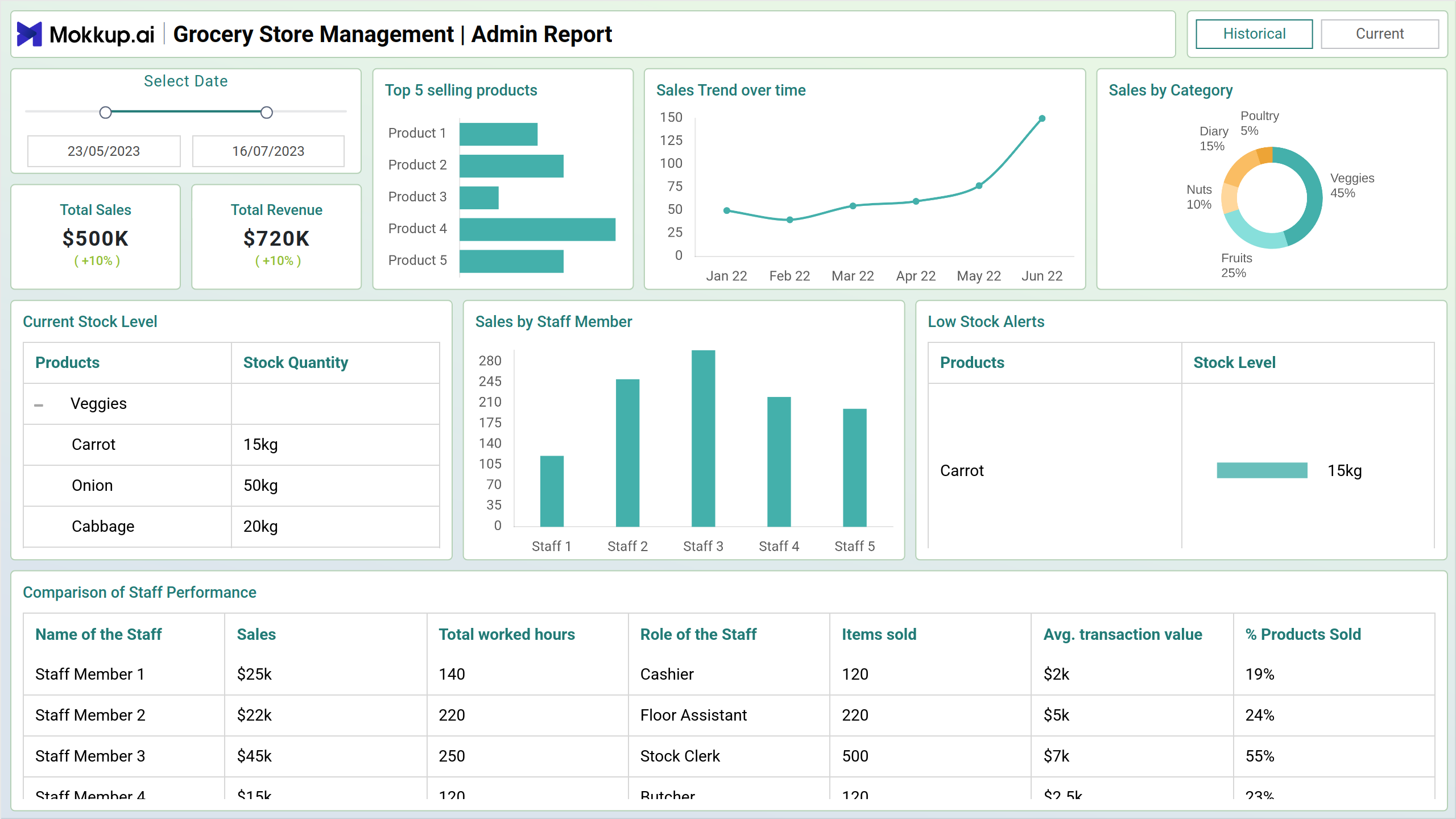
The grocery management template serves as a comprehensive wireframe, providing a detailed overview of the diverse facets of grocery operations. It offers insights into various critical aspects such as inventory management, sales analytics, customer trends, and staff performance. This template acts as a centralized hub for grocery store managers and staff to monitor and optimize operational processes, ultimately enhancing efficiency and customer satisfaction.
Screen 1: Admin
Offers insights into top-selling products, sales trends, category-wise sales, current stock levels, individual staff sales, low stock alerts, and staff performance comparison. Split into current and historical views, it provides real-time and past data for comprehensive analysis and decision-making in grocery operations.
Key Terms to consider:
- Current stock level: The template displays real-time updates on the current inventory levels of various products, enabling proactive inventory management.
- Sales by staff member: Users can track individual staff members' sales performance, facilitating targeted training and incentive programs.
- Top 5 selling products: The template highlights the top-selling products, aiding inventory replenishment and strategic product placement.
- Sales trend over time: Users can analyze sales trends, identify patterns, and make informed decisions for future inventory and marketing strategies.
- Sales by category: The template categorizes sales data by product category, providing insights into product popularity and customer preferences.
- Low stock alerts: Users receive alerts when stock levels fall below a specified threshold, enabling timely restocking to prevent stockouts.
- Comparison of staff performance: The template allows for comparing staff performance metrics, fostering healthy competition and identifying areas for improvement in sales strategies and customer service.
Screen 2: Staff
This view provides details about task list, sales performance, item-specific performance, customer ratings, sales trends, and top-selling products by staff, offering a detailed analysis of staff-driven sales and product performance within the grocery management system.
Key Terms to consider:
- Task list: The screen displays a comprehensive task list, helping managers and staff prioritize and track daily operational tasks efficiently.
- Sales performance: Users can assess individual and team sales performance metrics, facilitating targeted coaching and incentive programs to improve overall sales effectiveness.
- Item sold performance: The screen provides insights into the performance of specific items sold, aiding in inventory management and product assortment decisions.
- Sales overview: Users can quickly access a summary of sales data, including total revenue, average transaction value, and sales distribution by time or location, providing a snapshot of overall business performance.
- Sales trend: The template visualizes sales trends over time, allowing users to identify patterns, seasonality, and emerging market trends, guiding strategic decision-making and forecasting efforts.
Dashboard Template Insights
- The grocery management template provides a comprehensive overview of key operations.
- It covers areas such as inventory management, sales analytics, and staff performance and managers can make informed decisions using real-time data.
- Real-time data includes information on top-selling products, sales trends, and low stock alerts.
- The Staff view offers insights into individual sales performance and task management. This facilitates improved efficiency and customer satisfaction.
Conclusion
The grocery management template provides a comprehensive overview of operations through Admin and Staff views. Admin covers sales trends, stock levels, and staff performance, while the Staff view focuses on item specifics and staff-driven sales. Key metrics like Total Sales, Total Revenue, and Sales Overview offer overall sales performance for informed decision-making.