

Workspace Brand Kits
Each workspace has its own “Brand kit” tab, where the Workspace Owner keeps the kits that workspace projects can use. Workspace brand kits are available on Pro, Teams and Enterprise plans.
Create a Workspace Brand Kit
- Open your workspace and click the “Brand kit” tab (next to Projects, Members, Requests and Trash).
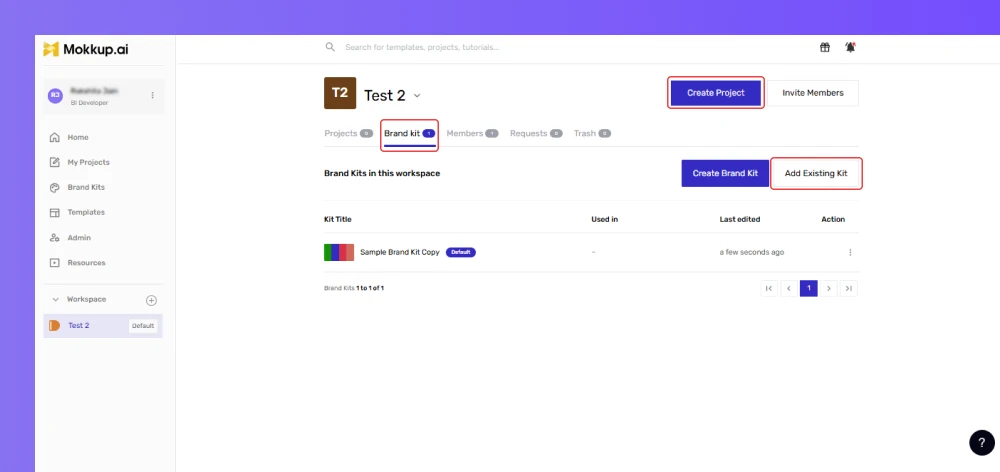
2. Click “Create Brand Kit”.
3. Set up the kit in the brand kit editor and click “Save Brand Kit”. The kit is saved to this workspace.
Add an Existing Brand Kit
-
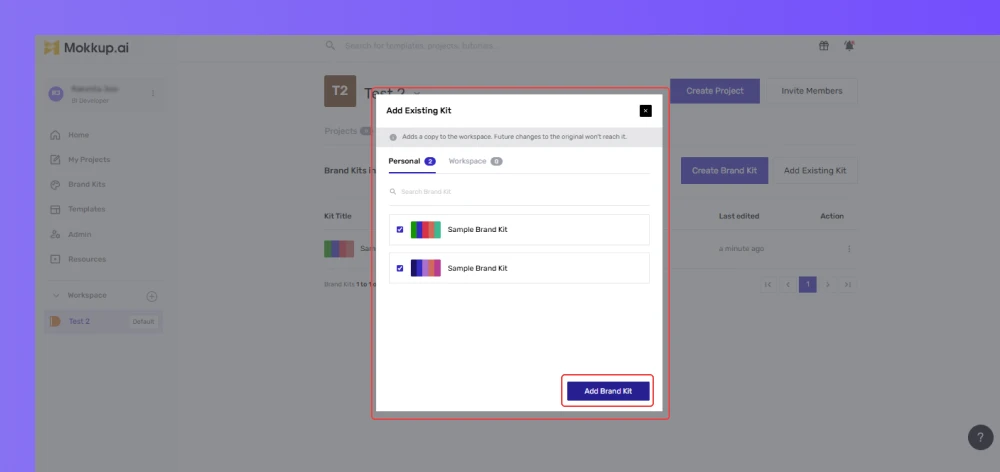
In the workspace's “Brand kit” tab, click “Add Existing Kit”.
-
Choose a tab: “Personal” for your personal kits, or “Workspace” for kits from your other workspaces (each labelled with its workspace name).
-
Search or scroll, and tick one or more kits.
-
Click “Add Brand Kit”.
The kits are added as copies named “<kit name> Copy”.
Note: Adding a kit creates a copy. Future changes to the original won't reach the workspace copy.
Tip: The first kit you create or add in a workspace becomes that workspace's Default kit. You can change it anytime with “Set as Default”.
Delete a Workspace Brand Kit
Deleting works the same as for personal kits. Deleted kits move to the workspace's “Trash” tab. Use the “Brand Kit” toggle there to see them, then click “Restore” or “Delete”.
Who Can Do What?
|
Action |
Owner |
Editor |
Commenter |
Viewer |
|---|---|---|---|---|
|
Create a kit or add an existing kit |
Yes |
No |
No |
No |
|
Set default, rename, duplicate, edit |
Yes |
No |
No |
No |
|
Delete or restore a kit |
Yes |
No |
No |
No |
|
See the workspace Brand kit list |
Yes |
Yes |
No |
No |
|
Use a kit to create a project |
Yes |
Yes |
No |
No |
|
See which kit a project uses |
Yes |
Yes |
No |
No |
|
View a project made with a kit |
Yes |
Yes |
Yes |
Yes |
Brand Kits on the Free Plan
- Free users can create and use personal brand kits.
- Workspace brand kits need a Pro, Teams, or Enterprise plan. On the Free plan, any action in a workspace's “Brand kit” tab opens the upgrade pop-up.
Note: If you move from a paid plan to Free, your personal kits keep working. Workspace kits are locked until you upgrade again. Projects already made with a workspace kit keep their styling, and you can still view the kit from the project's Design tab.