

Moving or Duplicating Projects on Mokkup
Moving or Duplicating Projects
A brand kit always stays in its own workspace. It doesn't move or get duplicated along with a project.
Move a Project to Another Workspace
-
Move the project as usual.
-
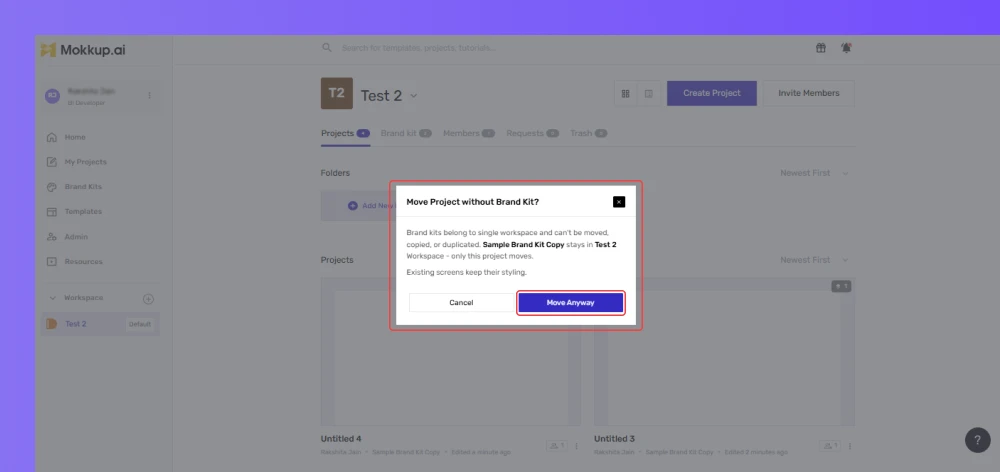
A “Move Project without Brand Kit?” pop-up appears.
-
Click “Move Anyway” to continue, or “Cancel” to keep the project where it is.
The moved project keeps its colors, text, and effects until you apply another theme. After that, it can't go back to the brand kit.
Tip: Moving a project to a folder in the same workspace keeps its brand kit, and no pop-up appears.
This was a complete guide to using Brand Kits on Mokkup. For further questions, please ask our Chatbot or contact Support.
Frequently Asked Questions
1. How many brand kits can I create?
There's no limit. You can create as many kits as you need on any plan.
2. Can I use brand kits on the Free plan?
Yes, you can create and use personal brand kits. Workspace brand kits need a Pro, Teams, or Enterprise plan.
3. If I edit a brand kit, will my existing projects update?
No. Each project keeps the kit as it was when the project was created. Your edits apply only to projects you create from then on.
4. If I add a kit to a workspace and then edit the original, does the workspace copy change?
No. Adding a kit to a workspace creates a separate copy. Changes to the original never reach it.
5. Can I change the brand kit of an existing project?
No. The kit is chosen when you create the project and can't be changed later. You can still apply any other theme from the Design tab.
6. What happens to my projects if I delete a brand kit?
While the kit is in Trash, your projects keep its styling, and you can restore it within 7 days. Once it’s permanently deleted, projects keep their current design, but you can’t switch back to that kit after applying another theme.
7. Why doesn't my AI-created project have a brand kit?
Projects created with AI don't use a brand kit. To use one, create a project manually or from a template.
8. Can Editors create or edit workspace brand kits?
No. Only the Workspace Owner can create, edit, duplicate, or delete workspace kits. Editors can see the list and use kits in projects.
9. Can I still add an element that's excluded from my brand kit?
Yes. Excluded elements are only flagged in the Elements panel. You can still add them to your dashboard.
10. How many logos can a brand kit have?
There’s no limit. You can add as many logos as you need in the “Logos” tab under Assets.