

Canceling the Enterprise Plan
The Enterprise Plan runs on an annual subscription model, which means your team receives uninterrupted access to unlimited AI Coins and BI Exports throughout the entire billing cycle. If you decide not to continue with the plan at the next renewal, you can request a cancellation before the renewal date. This guide explains how cancellation works, what happens to your team after cancellation, and the key rules you need to know.
Understanding Enterprise Cancellation
Because the Enterprise Plan provides annual benefits upfront, cancellations are not allowed mid-cycle. The plan remains active until the end of your current subscription year.
You can request cancellation anytime, but the change only takes effect when your annual cycle ends.
How to Cancel the Enterprise Plan
-
Log in to your Mokkup account.
-
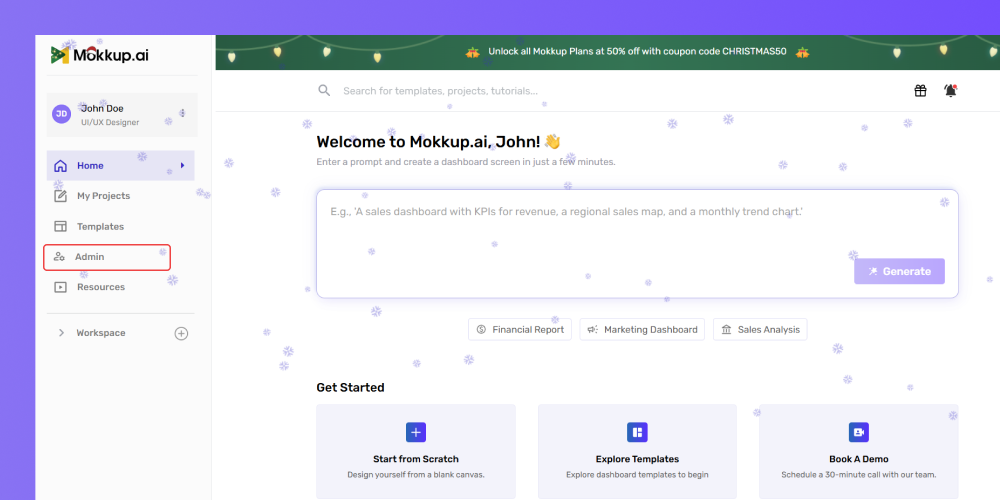
Click Admin in the left menu.
-
Navigate to the Existing Enterprise Plan section.
-
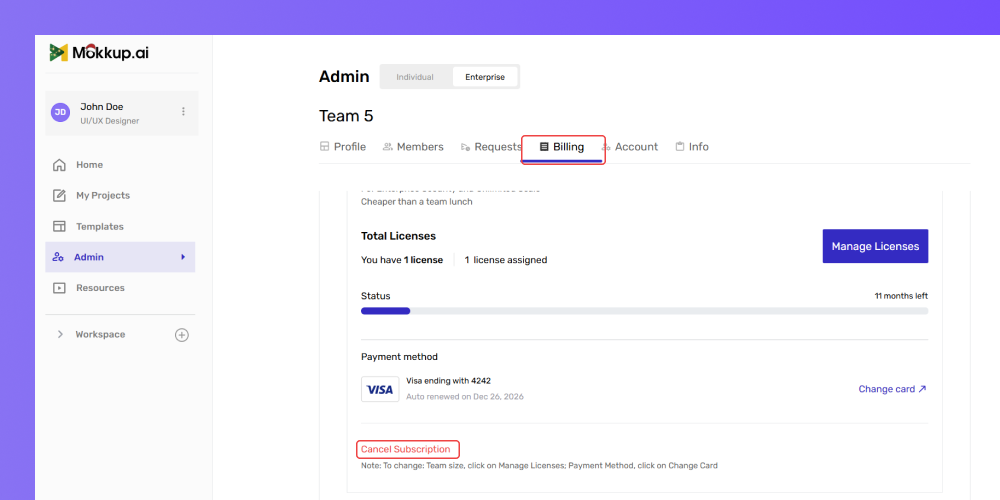
Go to the Billing section under your plan settings.
-
Click the Cancel Subscription button.
-
After clicking, you will be automatically redirected to another page.
-
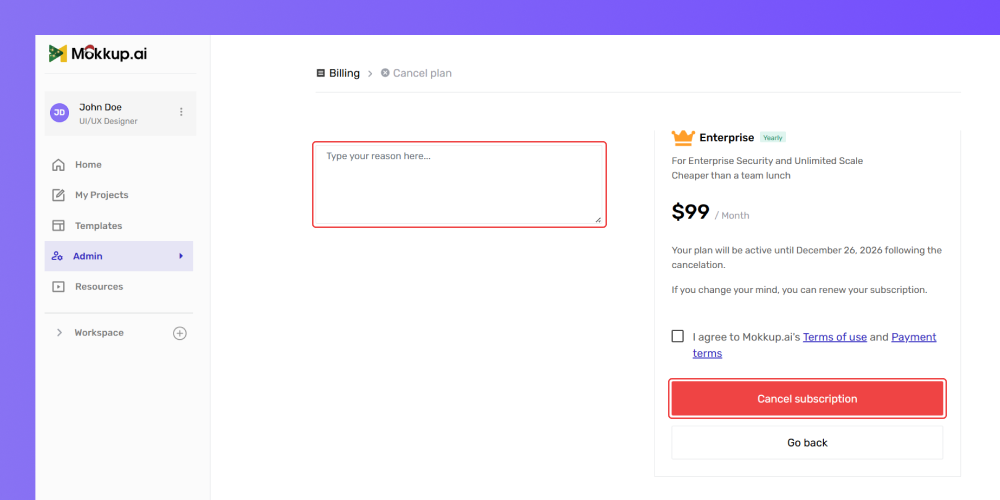
On the left side of the page, type in the reason for canceling your subscription.
-
Once you’ve entered the reason, click the Cancel Subscription button to proceed.
-
Check the box to confirm that you agree to the terms and conditions.
-
If you change your mind and do not wish to cancel, click the Go Back button located below the Cancel Subscription button.
A confirmation message will appear, letting you know that:
- Your plan will stay active until the end of the billing cycle
- You will not be charged again next year
- Your licenses and unlimited usage remain active until renewal
Review Team Access After Cancellation
Once cancellation takes effect at the renewal date:
- Your team will automatically move off the Enterprise Plan
- Unlimited AI Coins and BI Exports will be removed
- All users revert to Free User permissions unless you manually choose a different plan
- Any refund logic does not apply, since cancellation only occurs at renewal (no mid-cycle returns or partial credits)
If you want to switch to a different plan (e.g., Teams Plan), you can do so after the Enterprise subscription ends.
Frequently Asked Questions
1. Can I get a refund for unused months?
No. Enterprise plans are billed annually and are not refundable mid-cycle.
2. Will Stripe Balance be refunded to my card?
No. Stripe Account Balance is applied only to future Mokkup payments.
3. Does canceling affect team ownership?
No. Ownership stays the same unless manually transferred.